Docker로 Nginx를 사용중이라면 명령어가 좀 다른데요
바로 docker exec nginx nginx -t 라고 명령어를 쳐야 합니다.

그리고 네트워크가 다르다면 네트워크를 연결도 시켜줘야 합니다.
안할경우 upstream이 에러 있다고 뜹니다.
ubuntu@-vm:~/docker/wordpress/nginx/conf.d$ sudo docker network connect pet_default nginx
ubuntu@-vm:~/docker/wordpress/nginx/conf.d$ sudo docker exec nginx nginx -t

nginx: the configuration file /etc/nginx/nginx.conf syntax is ok
nginx: configuration file /etc/nginx/nginx.conf test is successful
ubuntu@doru2-vm:~/docker/wordpress/nginx/conf.d$
그 다음 Docker NGINX의 ssl 폴더를 확인해야 함
sudo docker compose stop nginx

sudo certbot certonly \
  --standalone \
  --config-dir ./ssl \
  --work-dir ./ssl/work \
  --logs-dir ./ssl/logs \
  -d remake.kr
그리고 아래 명령어로 인증서를 받는다
sudo docker run --rm \
  -v /home/ubuntu/docker/wordpress/ssl:/etc/letsencrypt \
  -v /usr/share/nginx/html:/usr/share/nginx/html \
  certbot/certbot:latest \
  certonly \
  --webroot \
  -w /usr/share/nginx/html \
  -d auto.remake.kr
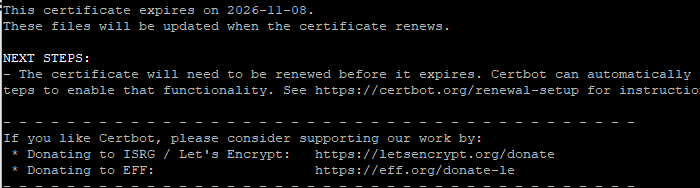
인증서가 잘 받아졌습니다.
server {
    listen 80;
    server_name remake.kr;

    location /.well-known/acme-challenge/ {
        root /usr/share/nginx/html;
    }


}
sudo docker compose exec nginx nginx -s reload
'IT Trend' 카테고리의 다른 글
| 유튜브 업로드시 중간광고 수 조절하기 (0) | 2026.09.02 |
|---|---|
| 워드프레스 자동 AI 글쓰기 (0) | 2026.08.16 |
| Iplay 50 mini pro Magisk 루팅하는 방법(벽돌 포함 (0) | 2026.07.16 |
| 시험 기간 ChatGPT 프롬프트 모음집 (0) | 2026.06.18 |
| gemini 문제가 발생했습니다. 다시 시도해주세요(13) (0) | 2026.05.30 |